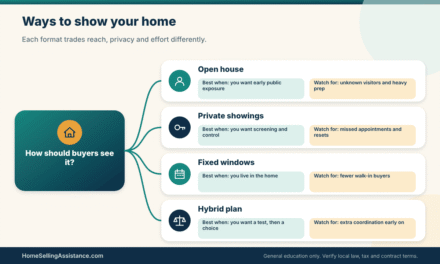
Weighing virtual staging vs home staging comes down to one practical question: how do you want buyers to see your house, first on a screen and then in person, and what are you willing to spend in money, time and credibility to shape that picture? Both sides of virtual staging vs home staging exist to help a buyer imagine living in your rooms, but they work in very different places and carry very different risks.
Most sellers meet this decision at the same moment. The agent or photographer has been through the house, the rooms are empty or crowded or simply tired, and someone says, “We could stage it, or we could do it digitally.” That sentence hides a lot. Physical staging means real furniture, art and linens placed in your rooms. Digital staging means software places furniture into photographs after the fact. The house itself does not change.
That last point is the heart of the virtual staging vs home staging debate. A digitally staged photo can make a vacant room look easy to understand, but the buyer who walks in will see the actual room, with the actual echo and the actual scuff on the wall. A physically staged room looks the same online and in person, but it costs more to set up and has to survive every showing.
This article is part of our wider home staging guide for sellers, and it is written for people who want to compare the two routes honestly before they sign a vendor agreement. We do not name winners, quote typical prices or promise a faster sale. Costs, local customs and listing-service rules vary a great deal, so the worked examples below use clearly labelled round numbers, and we point you to the people who can confirm the local facts.
A last note before we start. Staging is marketing, not repair, and it never replaces honest disclosure. Whichever route you choose, the property you describe should be the property a buyer finds. Keep that in mind and the rest of the virtual staging vs home staging decision becomes much more manageable.
Key takeaways
- They solve the same problem differently. Both help buyers picture the space, but digital staging works only in photos and video, while physical staging works in photos and in person.
- The virtual staging vs home staging cost gap is real but not the whole story. Compare setup cost, carrying cost, the time a room sits unstaged and the chance that a showing disappoints.
- Disclosure matters more with digital edits. Many listing services and state rules expect staged images to be identified, and you should confirm the rule where you live before you publish.
- Flexibility cuts both ways. Digital furniture can be swapped in hours, but you cannot hand a buyer a digital sofa, and physical pieces can be moved, repaired or removed on your schedule.
- Your situation decides the answer. Vacant homes, occupied homes, short timelines and tight budgets each push the choice in a different direction.
- Staging never hides defects. Do not use either method to conceal condition problems, and let your listing agent or attorney guide what must be disclosed.
What virtual staging vs home staging each try to solve
Before comparing prices, it helps to be clear about the job each option is hired to do. Staging is not decoration for its own sake. It is a way of reducing the effort a buyer has to spend to understand a room: where the bed goes, how a dining table might sit near the kitchen, whether a small bedroom can double as an office. When that effort drops, buyers tend to spend more attention on the house and less on guessing.
The two routes pursue this goal through different channels. One mostly lives in the listing gallery. The other lives in the house. Understanding that split makes the rest of the virtual staging vs home staging comparison easier to follow, because many of the trade-offs trace back to where the staging actually exists.
The illustration below shows the two paths a seller can take with the same empty or tired room, and the question each path asks you to answer.
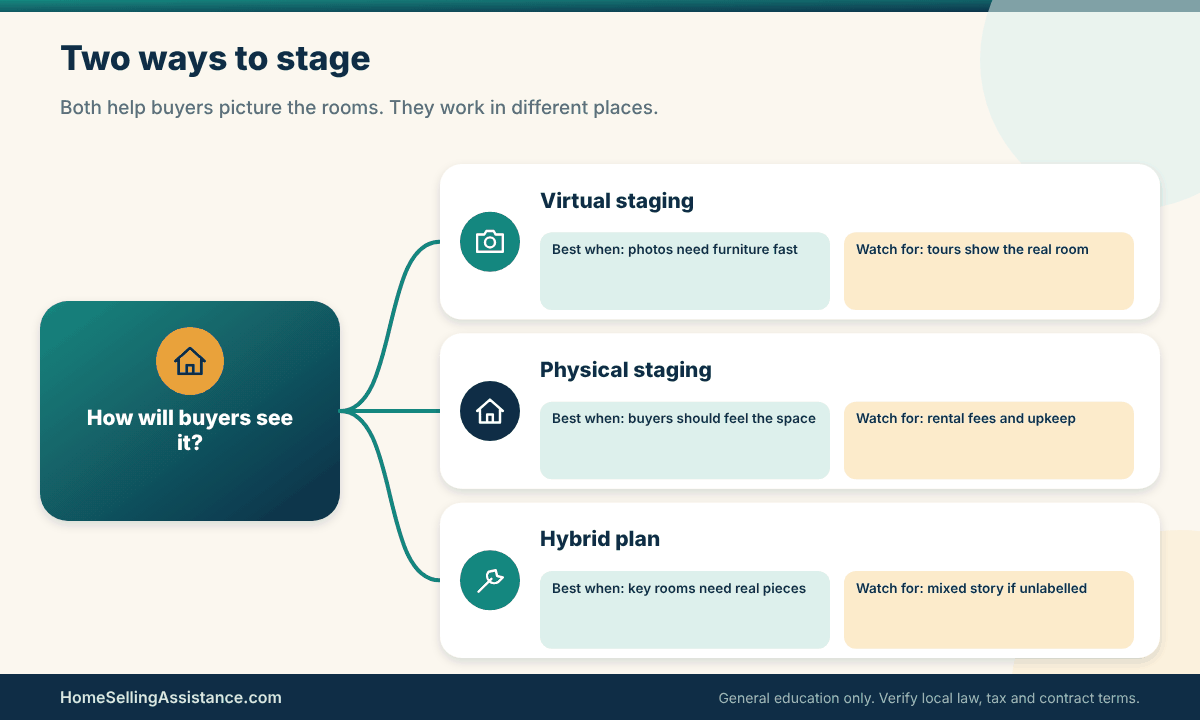
Virtual staging: digital furniture added to your photos
Virtual staging starts with ordinary photographs of an empty or lightly furnished room. A designer or software tool then adds digital furniture, rugs, art and sometimes décor, matched to the room’s size and light. The result is a set of images that look furnished. Some vendors also offer a “declutter” edit that removes loose items from a photo, and some offer day-to-dusk or similar image adjustments. These are different services with different disclosure questions.
Nothing physical happens in your home. That is the main appeal and the main limit. Digital staging can be ordered after photos are taken, revised through a few rounds of feedback and delivered in a short window, and it needs no truck, no storage and no coordination with your move-out date. It also means every buyer who tours will see the unstaged reality, so the digital version has to set an honest expectation.
Quality varies widely. Some images are convincing, with correct scale and believable shadows. Others have floating furniture, rugs that ignore the floor plane or sofas that would not fit through the doorway. Buyers notice. A clumsy edit can make a listing look careless, which is the opposite of what you paid for.
One more habit helps with any virtual staging vs home staging comparison involving digital work: ask how the vendor handles scale. A good provider asks for room dimensions, ceiling height and window positions before placing a single piece. A weak one simply drops furniture into the picture. If the vendor never asks about your floor plan, expect furniture that looks pleasant but would not fit the room you are actually selling.
Evidence to gather: sample images, vendor terms and your own room photos
Start by asking any vendor for a portfolio of before and after images in rooms similar to yours. Look closely at the edges of furniture, the shadows under legs and the way a rug meets the baseboard. Then ask what you actually get: how many rooms, how many images per room, how many revision rounds, and what the turnaround is. These terms matter more than a headline price.
Read the usage terms too. Who owns the finished images, and can the listing agent use them on the multiple listing service and on third-party sites? Are the unstaged originals included, so you can show both versions? Is there a charge for removing the watermark or for extra file sizes? Written answers now prevent surprises when the listing is about to go live.
Finally, take your own measurements and notes. Photograph each room at a sensible angle and write down the real dimensions. A vendor can place a sectional in a photo that would never fit in the real room, and you want to catch that before a buyer does. Keeping your own record also helps if you later need to confirm what the room truly looks like.
A scenario, an exception, and your next step for digital staging
Picture a vacant two-bedroom townhouse where the owner has already moved. In photos, the empty living room looks smaller than it is, and the second bedroom reads as a closet. Digital furniture can show a sofa and a desk, which gives buyers a sense of scale. For a listing like this, the virtual staging vs home staging comparison often looks favourable to the digital option because there is nothing to move and the schedule is tight.
Now the exception. If the room has a real flaw, such as an awkward column, low ceiling or a sloping floor, digital furniture that ignores it will create a gap between the online image and the walk-through. Buyers who feel misled by a photo rarely stay generous during negotiation. Do not use a digital edit to straighten, enlarge or repair anything the buyer will see in person.
Your next step is simple. Ask your listing agent whether your listing service has rules about labelling edited images, decide which rooms truly need help, and request a small test order before committing to the whole house. If you want help seeing how photographs fit into the larger plan, our guide to real estate photography for sellers walks through the shoot itself.
Physical home staging: real furniture, real rooms, real showings
Physical staging puts real objects in the house. A stager may use your own furniture rearranged and edited, or bring rental pieces, or blend both. They place seating, lamps, beds, rugs, art and small accessories, then adjust until each room has a clear purpose. Some sellers hire a consultant for a one-time plan and carry out the work themselves. Others hire a full service with delivery, installation and removal.
The strength of this approach is consistency. The buyer sees the same furnished room in the gallery, at the open house and during a private tour. They can sit on the sofa, open the closet and feel the proportions with their own body. The weakness is cost and logistics. Furniture has to be delivered, kept clean, protected from pets and children, and eventually removed, and each of those steps has a date and a price.
Physical staging also exposes the house to real use. Showings leave fingerprints, shifted cushions and the occasional damaged item. Most staging contracts spell out who is responsible, and those clauses deserve a careful read. Some sellers find the process steadying because the home feels finished. Others find it stressful because the house must stay show-ready.
It also helps to ask how a stager works with your photographer. In the virtual staging vs home staging discussion, sellers often forget that real furniture has to be in place before the shoot, so the delivery date and the photo date must be matched. A stager who understands photography will also arrange pieces for the camera angle, and will bring accessories that read well in a wide shot, not just in person.
Evidence to gather: quotes, rental terms and the inventory list
Request written quotes from at least two providers if you can. Ask what the fee covers: consultation, design, delivery, installation, a minimum rental period, extensions, removal and any damage or loss terms. A low initial quote with a high monthly extension can cost more than a higher quote with a generous first term, which is why the calendar belongs in the comparison.
Ask for an inventory list of the pieces that will be placed in your home, with the room each one belongs to. That list helps you check that nothing goes missing and that damage is documented. It also gives your insurance conversation a factual starting point. Many sellers do not think about homeowner insurance and rented furniture until something breaks, so ask your insurer or agent how rental items are treated.
If you plan to use your own furniture, build your own simple evidence file. Photograph each room as it stands, note what you will store, and decide what leaves before photos. Our guide to decluttering a house before selling is a useful companion, since even the best staging plan struggles in a room that is full of boxes.
A scenario, an exception, and your next step for physical staging
Imagine a lived-in four-bedroom house where the family is still in residence and the furniture is large, dark and arranged around a television. Digital staging would have to erase most of what is in the photos, and buyers would still tour a very different room. Here, the virtual staging vs home staging question may lean toward a physical edit: remove half the furniture, rearrange the rest, bring in a few rental accents and let the house look like itself.
The exception is the seller who cannot commit to the upkeep. If your household has small children, pets or a work-from-home schedule, a staged house can feel like a museum. A partial plan, such as staging only the living room, kitchen and primary bedroom, may be more livable. Our article on how to prepare a house for showing covers the daily routine in more detail.
Your next step is to walk through the house with the stager or agent and agree on a room-by-room list: which rooms need real furniture, which need only editing, and which can stay as they are. Get that list and the price in writing before any piece is delivered, and confirm the pickup date so the staging does not outlast the sale.
Comparing virtual staging vs home staging on money, time and control
Once you know what each option is, the virtual staging vs home staging comparison becomes a question of trade-offs. There is no single metric that settles it, so it helps to look at several at once: what you pay now, what you keep at closing, how long you wait, how much control you have, how much work lands on your household, and what happens if the plan fails.
We split the comparison into two parts. The first looks at the practical numbers and workload. The second looks at the harder questions of disclosure, buyer trust, financing and fallback. Both parts matter in any honest virtual staging vs home staging decision, and the second part is the one sellers tend to skip.
Net proceeds, schedule, control and workload side by side
Net proceeds are what you keep after the sale, so staging only helps if what it adds, in buyer attention and offer strength, outweighs what it costs. Nobody can promise that outcome. What you can do is make the cost side visible and compare the two plans on the same footing, using quotes rather than assumptions.
The matrix below sets virtual staging vs home staging next to each other across the factors sellers ask about most. Use it as a conversation starter with your agent and your vendor, not as a verdict. The right-hand columns are the ones that vary most from house to house, so read them with your own property in mind.
| Factor | Virtual staging | Physical staging | What to check |
|---|---|---|---|
| Upfront cost | Usually charged per image or per room | Consultation, design and delivery fees | Written quotes with all fees |
| Carrying cost | Typically none after delivery | Monthly rental if the sale takes longer | Extension rate and minimum term |
| Net proceeds effect | Smaller outlay, no change to the room in person | Larger outlay, same look online and in person | Your own cost worksheet |
| Time to launch | Often quick once photos exist | Needs scheduling, delivery and setup | Photo date and go-live date |
| Contingency impact | None on contract terms | None, but damage terms may apply | Contract and staging agreement |
| Workload for you | Light, mostly review and feedback | Heavy during setup and showings | Household schedule and pets |
| Execution risk | Mismatch between photos and the real room | Damage, delays or an unfinished look | Disclosure rules and insurance |
To use the matrix, add one line of your own beside each row. Under “Upfront cost” write the real quote. Under “Time to launch” write your photo date, your target list date and the number of days the staging plan needs. A column that looks balanced in the abstract often tilts once your own dates and numbers are in it.
Evidence to gather: a simple net-cost worksheet
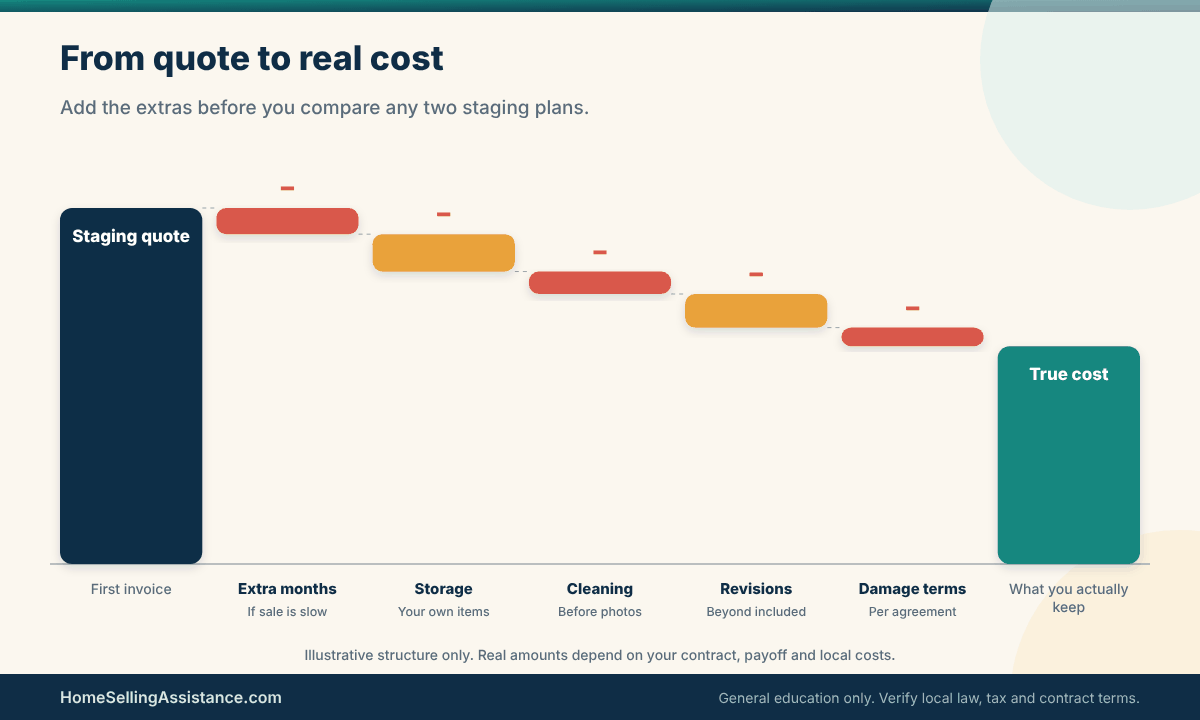
Build a worksheet with three columns: the cost of virtual staging, the cost of physical staging and the cost of doing neither. Fill each with real quotes plus the extras sellers forget, such as storage for your own furniture, a cleaning visit before photos, and a few weeks of rental extension. The “neither” column matters because it shows what you are actually trying to improve.
Here is an illustrative example using round figures that do not reflect any market. Suppose a digital package costs $400, a physical plan costs $3,000 for a first period and $800 per extra month, and the house sells in two months. Physical staging would then total $3,800, or $4,200 if it takes three. These numbers only show how the calendar changes the answer. Your quotes will differ.
Then add the benefit side honestly. You cannot know how much extra a buyer will pay, so do not write a number for it. Write a question instead: which plan is more likely to give buyers a clear picture of this particular house? Pair the worksheet with your agent’s local judgement, and revisit the home sale net proceeds picture so you can see how staging fits among the other costs of selling.
A second tool is a short list of questions you ask each provider the same way. How many images or rooms are included? What is the turnaround? What happens if I am unhappy? For a physical plan, what is the first rental period and the monthly extension rate? Asking the same questions in the same order makes the virtual staging vs home staging quotes comparable, and it keeps a persuasive sales call from steering the conversation.
Mini scenario: when the cheaper line item costs more
A seller chooses the cheaper digital package for a vacant house. The photos look great and traffic is strong. But the first few tours end with comments that the rooms feel cold and smaller than the pictures suggested. The seller then pays for a rushed physical setup anyway. The total is higher than a single physical plan would have been, and two weeks of listing time passed in between.
Now the reverse. A seller books a full physical plan for a house with a tight timeline, and delivery slips by a week because of a scheduling problem. The photos wait, the listing date moves and each day of carrying cost adds up. In that case a faster digital option for the gallery, combined with a light physical touch for tours, would have protected the schedule.
The lesson in the virtual staging vs home staging comparison is that a cheaper first invoice is not the same as a cheaper outcome. Ask your agent which plan fits your list date, and write down the date you will review the plan if early activity is slow. A review date turns a guess into a decision you can adjust.
The graphic below shows how a staging cost can build up from a single quote into a real total once extensions, storage and cleaning are added, which is the habit worth copying in your own worksheet.
Disclosure, buyer trust, financing and fallback risk
The money questions are easy to see. The trust questions are quieter and can do more damage. Buyers form an impression from photos long before they meet you, and an impression that does not survive a tour tends to cost the seller goodwill. That is where disclosure, financing realities and a plan B belong in the virtual staging vs home staging conversation.
Two facts are worth holding onto in any virtual staging vs home staging decision. First, staging changes how a home looks, not what it is, so appraisers, inspectors and lenders assess the actual property. Second, the rules about labelling edited images come from several places: your listing service, your state’s licensing or advertising rules, and general consumer-protection principles. They differ, so confirm them locally instead of assuming.
Think of trust as part of the budget. A listing with honest, clearly labelled photos tends to produce fewer awkward first impressions than one where buyers feel a trick was played. In the virtual staging vs home staging comparison, digital work carries the larger labelling duty, while physical work carries the larger maintenance duty. Neither duty is hard to meet if you plan for it before the listing goes live.
Evidence to gather: MLS rules, state advertising rules and listing language
Begin with your multiple listing service. Many have rules about photo content and about identifying images that have been digitally altered, but the wording and the enforcement vary. Ask your listing agent for the current rule in writing, and ask how a staged photo should be labelled, for example with a short note on the image or a line in the remarks field.
Next, ask about state and local expectations. Your state real estate commission publishes advertising and licensee conduct guidance, and a local attorney can tell you how those rules apply to a seller’s photos. We do not state a single rule here because none applies everywhere. If you are unsure, a plain label such as “virtually staged” next to the image is a common-sense way to avoid confusion, though your own rules govern.
Finally, review the listing description. If photos show furniture that will not convey, say so clearly. If photos show digital changes, make sure the text does not imply the room is bigger, brighter or in better shape than it is. Our guide to writing a real estate listing description covers how to keep copy and images consistent.
Fair housing is part of this too. Staging should present the house, not suggest who should live in it. Avoid décor or text aimed at a particular group of buyers. The federal HUD fair housing resources explain the broad principles, and our article on fair housing for home sellers goes through practical examples.
The checklist below pulls these labelling and disclosure points into one place, so you can run through it with your agent before any staged photo goes live.

What to do if a buyer feels misled
Sometimes a buyer arrives, looks around and says the home does not match the photos. Do not argue. Acknowledge the difference, point out that the images were labelled, and let the buyer tour at their own pace. If the label was missing, correct it immediately. A quick fix usually costs less than a long reputation problem.
If the issue continues into negotiation, keep the conversation factual. Staging does not change square footage, condition or included items, and your contract and disclosures already describe those. Ask your agent to confirm in writing which items convey, so nobody remembers a digital sofa as part of the deal. If a dispute becomes serious, talk with a real estate attorney in your state, because we cannot assess a specific situation. For general background on honest advertising, the FTC consumer information site is a reasonable starting point for virtual staging vs home staging questions about misleading images.
On the financing side, a digital edit has no effect on the buyer’s loan, the appraisal or the inspection, which examine the real house. Physical staging can matter slightly at the margins: a lender’s appraiser may note the condition and layout they see, though furniture itself is not part of the valued property. Do not count on either route to change an appraisal, and read our overview of how to price a house to sell if you are worried about the gap between list price and appraised value.
Plan a fallback for your virtual staging vs home staging choice too. If digital images fail to bring traffic, decide in advance whether you will add physical staging, change photos or adjust price. If physical staging bumps into a delay, decide whether the gallery goes live with digital images first. A fallback written down before you need it removes the pressure to make a rushed choice later, and it keeps the virtual staging vs home staging plan flexible instead of fragile.
It also pays to talk about timing with your lender-minded buyers in mind. Offers often arrive with contingencies and inspection periods, and staged furniture can get in the way of an inspector who needs access to a panel, an attic hatch or a crawl space. Whichever side of the virtual staging vs home staging question you land on, tell your agent which areas must stay clear, and ask the stager to avoid blocking them.
Choosing between virtual staging vs home staging by seller situation
Because the right answer to virtual staging vs home staging depends on the house, the household and the calendar, a universal winner would be misleading. A better method is to describe your situation first and then see which route the facts favour. Two situations come up constantly, and between them they cover many of the cases sellers face.
Keep in mind that a scenario is a starting point, not a script. Your neighbourhood, price range and season all shape what buyers expect, and a virtual staging vs home staging choice that suits a condo near the city may not suit a larger house farther out. Treat the examples as questions to put to your agent, and let local evidence, such as how similar listings are presented, break any tie.
Before the longer stories, the table below gathers several common virtual staging vs home staging situations in one place. It is meant to help you recognise your own, not to replace a conversation with your agent. Each row names the route that tends to be favoured, the reason, the cost of choosing it and the single fact that could change the answer.
| Situation | Route favoured | Reason | Trade-off | Fact that changes it |
|---|---|---|---|---|
| Vacant house, tight list date | Virtual first | Fast, no setup or storage | Tours show empty rooms | How long the sale takes |
| Vacant house, slow local activity | Physical or hybrid | Buyers can feel the space | Rental cost keeps running | Agent’s read of local demand |
| Lived-in, dated furniture | Physical edit | Rearranging beats erasing | Disruption at home | Willingness to store items |
| Small budget, move-in ready | Light virtual or consult | Low spend, clear photos | Limited in-person effect | Condition of key rooms |
| Several odd-shaped rooms | Physical for those rooms | Scale is hard to fake | Higher cost per room | Which rooms buyers question |
| Out-of-town owner | Virtual plus agent oversight | No one on site to supervise | Photos may oversell rooms | Local rules on labelling |
To use the table, find the row nearest to your situation and read the last column first. If the fact that changes the choice is something you can learn this week, such as a quote or a labelling rule, learn it before you commit. The decision then rests on information rather than hope.
If more than one row fits, that is normal. A vacant house owned by someone out of town sits in two rows, and the two answers may point in different directions. When that happens, rank your priorities: speed, spend, in-person impact or low effort. The virtual staging vs home staging choice usually becomes clearer once you decide which of those four matters most to you right now.
Scenario one: the vacant house that photographs empty
Vacant homes are the classic case for the virtual staging vs home staging question. Without furniture, rooms lose their scale, ceilings seem higher, and flaws seem larger. Buyers also find empty rooms harder to relate to, which can slow interest. The owner often lives elsewhere, so a staging plan has to work without daily supervision.
Vacant homes have their own practical issues, too. Utilities may be off, the yard may need attention, and security is a real concern. Our article on selling a vacant house covers those risks, and the virtual staging vs home staging choice should sit alongside them, not replace them.
An empty house also raises a question that sellers rarely ask: what will buyers compare it to? They are often scrolling through occupied homes and empty homes in the same afternoon. If your photos look furnished and the tour does not, the contrast can feel jarring. If both look empty but crisp, bright and honest, buyers adjust quickly. Good lighting, clean floors and tidy windows do as much work as furniture does.
Evidence to gather: photo dates, room sizes and the carrying-cost clock
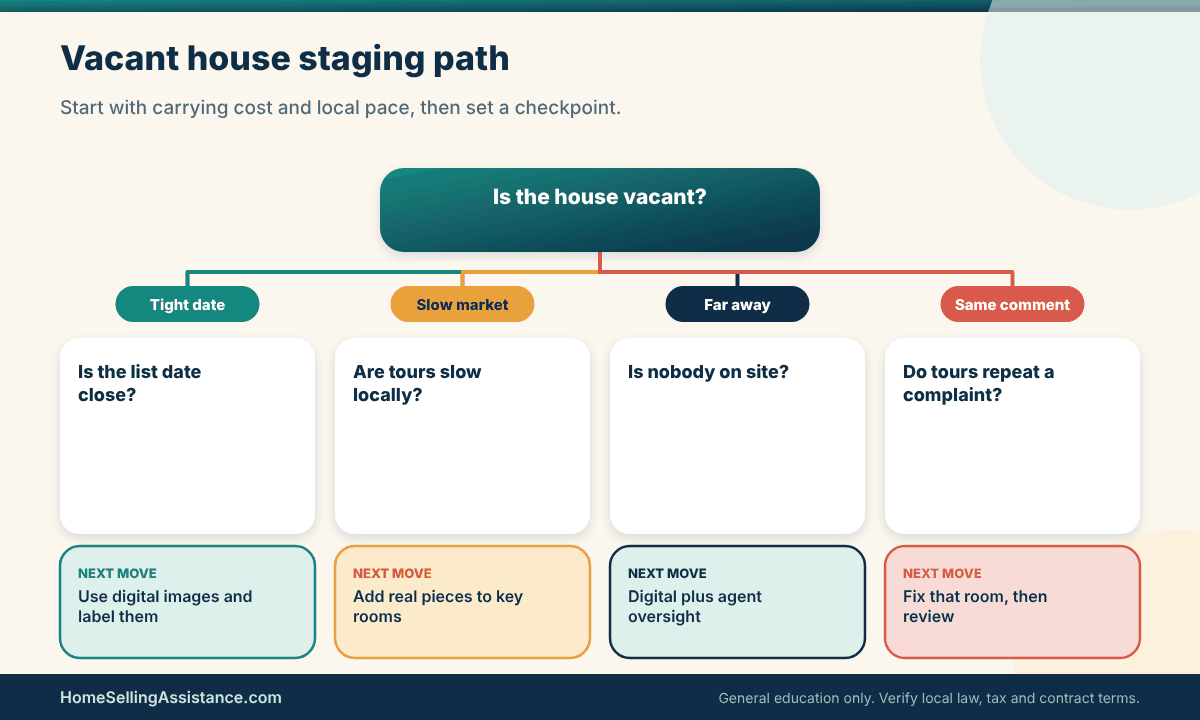
For a vacant house, three facts decide most of the virtual staging vs home staging comparison. The first is the photo date: when does the photographer come, and can staging be ready by then? The second is the room list: which rooms look confusing when empty, usually the living area, a small bedroom and any flex space? The third is the carrying-cost clock: what do mortgage, taxes, insurance and utilities cost per week while the house sits?
Put those three together and the options become clearer. If the carrying cost is high and the photo date is close, a digital package for the gallery avoids delay. If carrying cost is modest and the market in your area is slow, a modest physical setup in two or three key rooms could give tours a better chance. Your agent can describe how long similar homes in your area have been taking.
Ask for the room-by-room plan in writing. A vendor who says “we will stage the main spaces” has not told you which rooms or how many images you will receive. Write the answers into the order, along with the delivery date and the number of revisions, so you can check the finished work against what you paid for.
The decision tree below turns that idea into a small flow: start with the carrying-cost clock, then follow the branch that fits your market, and note the next move at the end of each path.
A scenario, an exception, and your next step for the empty house
Take a seller who moved for work and left a vacant three-bedroom home behind. The photographer is booked for Thursday, and the agent wants the listing live by the weekend. The seller orders digital staging for four rooms, labels the images and publishes. Early online interest is good, and tours confirm that most buyers are comfortable with empty rooms once they know what to expect.
The exception arrives when several tours end with the same comment: the living room feels dark and small. The agent suggests placing a few real pieces there, a sofa, a rug and a couple of lamps, for a month. That small physical addition costs far less than staging the entire house, and it targets the one space buyers questioned. The hybrid approach responded to evidence rather than guesswork.
Your next step is to agree a checkpoint with your agent. Pick a date, perhaps two weeks after launch, to look at online views, showings and comments, and decide whether to add physical pieces, change the photos or revisit the price. For the pricing question itself, see our guide to overpricing a house, since no staging plan can fully offset a price that does not match the market.
Scenario two: the lived-in home with dated furniture
The second situation is almost the opposite. The home is furnished, the household is still living in it, and the furniture reflects years of daily use. Walls may be crowded with family photos, shelves are full and the layout was designed around the owners, not around buyers. In a virtual staging vs home staging comparison, digital staging can remove or replace furniture in a photo, but the tour still shows the real thing.
For these homes, much of the benefit comes from editing rather than adding. Taking away a third of the furniture, clearing counters, rearranging seating and softening bold colours with neutral linens can change a room dramatically. A stager can guide those choices, and some of the work is free if you do it yourself. Our curb appeal checklist for sellers applies the same editing mindset to the exterior.
Sellers sometimes assume that an occupied home cannot be staged at all. In practice, a lighter version often works well: clear surfaces, remove personal photos, swap heavy bedding for neutral linens and group furniture so each room has one clear job. That kind of virtual staging vs home staging middle path asks little of a household beyond time and a few boxes, and it often matches what a consultant would suggest anyway.
Evidence to gather: a room-by-room edit list and storage plan
Walk each room with a notepad and sort items into three groups: stays, goes to storage, goes out. Take photos from the doorway, since that is how buyers first see a room. Note which pieces block pathways or dominate a wall, and which rooms have no clear purpose. A consultation with a stager, even a short one, can turn that list into a plan with a price you can compare against a digital package.
Then work out where the stored furniture will actually go. A garage, a relative’s spare room or a short-term storage unit all have different costs and different risks of damage. Price this honestly, because it belongs in the physical column of your worksheet. A plan that looks cheap until the storage bill arrives is a common source of regret.
Finally, think about daily life. Will you keep beds made, counters clear and toys put away for weeks? If the answer is no, say so now, because your stager can design a plan around how you will really live. Our guide to what a seller should do during a showing and our note on selling a house with pets help with the routine.
The scale below weighs the two routes against each other for a furnished home, so you can see which side your own priorities push toward.

A scenario, an exception, and your next step for the lived-in home
A family with two children and a dog lists a house they are still living in. The living room has an oversized sectional, and the primary bedroom holds two dressers and a treadmill. They hire a consultant, store about a third of their furniture, and rent only a few accent pieces. Photos look natural, and tours match the photos, since the rooms are real rooms, only edited.
The exception shows up in one place: the unfinished basement. Staging it fully would cost more than the family wants to spend, and the room has little natural light. They use a digital edit for two basement photos, label them, and note in the description that the space is unfinished. Buyers know what to expect, and the family avoids an expensive setup for one room.
Your next step in the virtual staging vs home staging decision is to decide which rooms deserve real effort and which can be handled lightly. If you are also deciding between fixing and selling as is, our comparison of renovating before selling vs selling as is helps you see where staging money belongs. Choose the plan you can sustain through the whole listing period, then review it at your checkpoint.
A final thought on the whole virtual staging vs home staging decision: write down why you chose your plan. A single paragraph, covering your budget, your timeline, the rooms involved and the labelling approach, becomes a useful record if the listing changes course. It also makes it easier to explain your choice to a partner, a co-owner or an agent, and to change it calmly if the market gives you new information.
Quick scenario
A seller has two weeks before the photographer arrives and a household that cannot keep a staged home tidy. She orders digital staging for the three rooms that photograph worst, labels each image, and asks her agent to review online views and tour comments after two weeks. The virtual staging vs home staging decision here was not about which option is better in general. It was about which option fit her calendar, her household and her willingness to adjust.
Frequently asked questions about virtual staging vs home staging
Is virtual staging cheaper than physical staging?
Often the first invoice is smaller, because digital packages are usually priced per image or per room and need no delivery. But the comparison depends on how long your house is on the market, since rental furniture can keep charging. Ask for written quotes for both, add storage and cleaning, and compare the totals over a realistic timeline. Prices vary by region and vendor, so we do not quote typical figures.
Do I have to tell buyers that photos are virtually staged?
Rules vary by listing service, state and local practice, so ask your listing agent for the current requirements in writing. Many sellers label staged images clearly because it avoids confusion and protects trust. A short note on the photo or in the listing remarks is a common approach. If you are unsure, your state real estate commission or a local real estate attorney can explain what applies where you live.
Can a digitally staged photo hide problems in the house?
It should not be used that way. Editing out stains, damage or structural issues can mislead buyers and may create legal problems, and disclosure rules apply to the property regardless of how photos look. Staging is for presenting furniture and layout, not for repairing the picture. If a condition problem exists, address it or disclose it as your state requires, with guidance from your agent or attorney.
Will virtual staging vs home staging affect the appraisal?
Appraisers value the real property, including its size, condition and features, not the furniture or the photos. A digital edit has no effect on the house, and rented furniture is not part of the valued property. Neither route should be counted on to change an appraisal, which is why pricing with local comparable sales matters more than staging for that question.
What happens if buyers walk in and the rooms look different from the photos?
Some buyers feel disappointed, especially if the edit was not labelled. The best response is to acknowledge the difference calmly, point to the label and let them look around. If the label is missing, add it right away. Choosing images that show the rooms honestly, including sensible furniture sizes, reduces this risk from the start.
Is a hybrid approach sensible?
Many sellers combine the two, for example digital images for rooms that are hard to stage in person and real furniture in the living room or kitchen. A hybrid virtual staging vs home staging plan can control cost while still giving buyers a physical sense of the home. The key is to keep the story consistent, so photos and tours do not tell different stories, and to label digital images wherever the rules ask.
How long does physical staging need to stay in place?
It depends on the contract and the sale. Most providers set a first rental period and charge for extensions, so the length of the listing drives the final cost. Ask what happens if you accept an offer but closing is weeks away, because some agreements run until the pieces are collected. Write the pickup date and extension terms into the agreement.
Who is responsible if staged furniture is damaged?
The staging agreement usually answers this, and the terms differ. Some providers hold the seller responsible for damage while pieces are in the home; others include a limited allowance. Read the clause before signing, take dated photos at delivery, and ask your insurer or agent how rental items are treated under your homeowner policy. A short conversation now avoids a dispute later.
Should I stage at all if my house is in good shape?
Not every house needs it. A clean, edited, move-in-ready home may do well with light decluttering and good photographs, and a staging budget might be better spent on a repair or on pricing advice. Ask your agent how similar homes in your area are presenting, and consider a consultation rather than a full package. Our guide to how to choose a listing agent includes questions about marketing plans.
Make the choice that fits your house
The virtual staging vs home staging decision is not about finding the winning technology. It is about matching a plan to your house, your calendar, your household and the rules where you live, then checking the plan against real results. This article is general education, not legal, tax or financial advice, so confirm the specifics with your listing agent, your state real estate commission or a local attorney. For the bigger picture, return to our staging, photos and showings guides.